

MessagePay
A Quick & Easy Way to Make Loan Payments
With MessagePay, payments can be easily made using a debit card or external bank account directly from a phone, tablet, or computer.

With MessagePay, members can receive friendly payment reminders via text message. The best part is the payment is processed immediately, directly from a text on your mobile device.
Now you can make payments directly from a text on your mobile device! With MessagePay, you’ll receive friendly payment reminders via text message. The best part is you can make a payment right then, directly from a text on your mobile device.
Setting Up Your Account



What You Should Know
You will receive a text message with the amount due on your loan. Review your payment options or opt out of our text message service by texting “STOP”.
Tap the link with the text message to verify your account with your account number and date of birth within the payment portal.
To verify your account the first time, set up the following:
4-digit PIN: upon account verification, you will be prompted to create a 4-digit PIN. This PIN will be used to verify future payments.
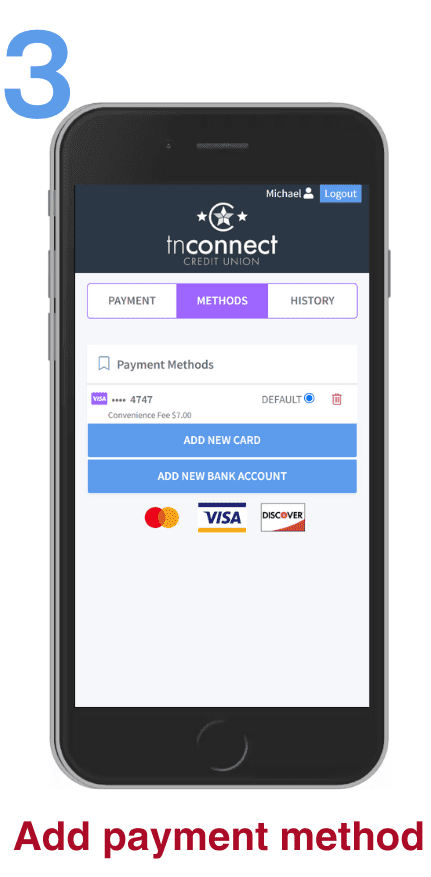
Preferred method of payment: to make a payment, add your preferred form of payment in the portal. Select ADD NEW DEBIT CARD or ADD NEW BANK ACCOUNT which will prompt a secure website to input your information. If done correctly, there will be a message stating ‘Payment Method Success’, and you will be redirected to the payment portal.
Once your account has been successfully verified, all loans and preferred payment methods are available within the portal.
Member Benefits
The transaction fee is only $7.
Encrypted information guarantees your information is secure
Convenient ways to pay from an external account with MessagePay: text, tnConnect website
Payments accepted from debit card or external accounts
Other Ways to Pay
We offer several fee-free ways to make loan payments including:
ACH – Schedule a payment from another financial institution
Mail a check with your loan coupon
Get Started
MessagePay FAQs
-
Yes, you will have access to the payment portal through our website.
However, you will not receive any text notifications regarding payment reminders and will not be able to make a payment via text message.
-
Once you receive a text reminder, you respond “Pay” to the same text. You will be asked to enter your PIN to verify your account. Once you have completed this process, your payment will be complete.
NOTE: You will have to set up a 4-digit PIN and preferred method of payment prior to using text payments. You may not pay using a credit card.
-
Yes. MessagePay replaces the old payments page for all loans.
-
No. Members who have automatic payments already in place can disregard the monthly MessagePay alert.
-
Yes. MessagePay will direct Members to a third-party site that is completely secure.
-
Sorry, loan payments cannot be made via credit card.